KidsAR

Snap a few photos of a beloved toy, and KidsAR turns it into a character your child can set loose in the real room — a true 3D model, or a hand-drawn flat friend that always turns to face you.
Point at the floor. Tap. Boing — it's there.

Meet Blueberry
Blueberry greets your child with a friendly spoken hello — a different one each visit — and walks them through a five-step spoken tutorial with captions. All of Blueberry's voice lines are bundled with the app, so the welcome works even with no connection at all.
One real toy, two kinds of friends
KidsAR ships with no canned content. Every character starts as a toy your family actually owns — a parent photographs it, and the cloud does the rest.
A 3D Friend
A guided photo lap around the toy becomes a true 3D model — rebuilt in the cloud by the same reality-capture pipeline that powers BIMGeoSpace. Once it's ready, it downloads to the device and places like the real thing.
A Flat Friend
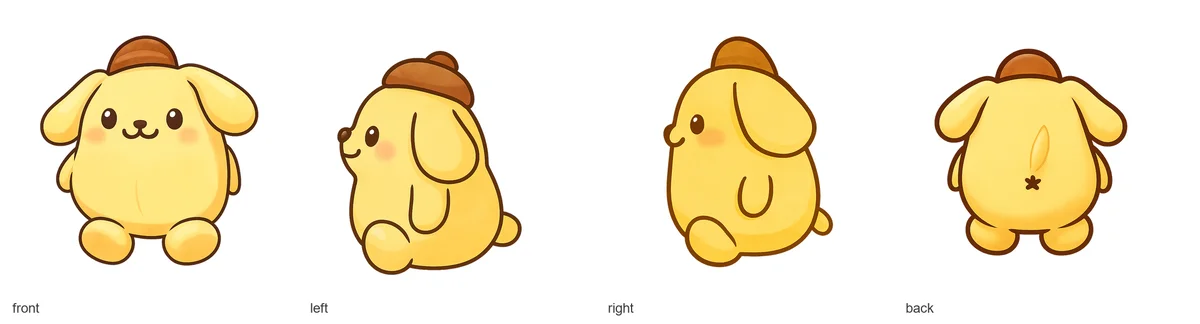
Four photos — front, back, left, right — become a storybook-style flat character. In the room it always turns toward you, swapping to the correct view as your child circles it.
Making a friend needs an internet connection. Finished friends are saved on the device — placing and playing works offline.
Then the room becomes the toy box
Playful sounds and little haptic taps back up every action — a pop when a toy lands, a poof when it goes, a sparkle for a brand-new friend.
Tap to place
Point the phone at the floor, tap, and the toy pops into the room with a bouncy overshoot.
Poke for a wiggle
Tap a placed toy and it does a springy squash-and-stretch wiggle with a little hop and a "boing."
It feels alive
Flat friends gently breathe and bob while they wait — each one on its own rhythm, so no two move in lockstep.
It turns to face you
Walk around a flat friend and it shows the right side — front, back, left, or right — as you circle it.
Multiply at will
Place as many copies as you like. One puppy can become a whole parade.
Any size you want
Make each friend bigger or smaller in My Toys — pocket-sized or couch-sized.
Parents hold the keys
Parent PIN gate
Creating a new friend sits behind an offline 4-digit parent PIN. Kids can browse and place toys freely — only a parent can start a scan.
Made in the background
Building a friend takes a little while, so it runs in the background — your child keeps using the app, and a notification announces when their friend is ready. 🎉
What leaves the device
Your photos of the toy are uploaded to our cloud pipeline to build the model; flat friends are illustrated with the help of AI. Finished friends are saved on the device and place offline. No ads, no analytics events — standard crash reporting only.
Kid-simple on top, serious AR underneath
KidsAR shares its reality-capture DNA with BIMGeoSpace — the same photogrammetry pipeline that documents construction sites rebuilds teddy bears.
ARCore
Google's AR engine — local room tracking (SLAM) to anchor toys on real surfaces
SceneView + Filament
Physically-based 3D rendering of models and camera-facing sprite billboards
Kotlin
100% Kotlin Android app
Photogrammetry Pipeline
3D friends are rebuilt by the same cloud reality-capture pipeline that powers BIMGeoSpace
Flat-Friend Service
AWS Lambda + S3 + DynamoDB service that turns four photos into a four-view character
Background Jobs
WorkManager polls the cloud and notifies when a friend is ready
Encrypted Storage
Identity and parent PIN live in encrypted on-device preferences
ARCore-Capable Devices
Runs on ARCore-supported Android phones and tablets
 🔧 In active development
 Want in when the beta opens?
KidsAR is being built right now. Drop us a line and we'll let you know the moment there's something to try.