BIMGEOSPACE
BUILT BY CONSTRUCTION PROFESSIONALS — EXCLUSIVELY
3D reality capture, ReCap-ready scans, and GPS-anchored construction management — in one field tool.
Understand your site. Anchor it to GPS. Manage it in real time. Collaborate across the crew.
// AR SHOWCASE
Geospatial AR in Action
Geospatial lock leveraging VPS where available, with GPS as a fallback — real model placement, real cloud sync. No mockups, no simulations.
// POSITIONING SOURCES
Three Signals. One Lock.
BIMGeoSpace hands off between three positioning sources automatically — you never flip a switch. The accuracy halo turns green when the lock is solid, whichever source is carrying it.
Visual Positioning
Google's VPS matches your camera view against global street-level imagery to locate you to the nearest foot — best outdoors, in mapped areas, with good light.
Satellite GPS
When VPS coverage is thin or the sky is obstructed, GPS picks up. Less precise than VPS but gets you to the right place — the app keeps working.
World Tracking
The phone's own SLAM holds anchors rock-steady once you're in place, and bridges brief GPS or VPS dropouts without the scene jumping.
Global Coordinates
Every anchor is pinned to real lat/lon/alt. Walk away for a week, come back, and the models are exactly where you left them — for everyone on the team.
Model Viewing & Orientation
Browse placed 3D models anchored to their GPS coordinates. Walk around them — they hold their global orientation across sessions.
Tap-to-Place 3D Models
Select a model from your library and tap any surface. Pumps, tanks, filters — each one drops at the exact GPS coordinate, ready for your team to view in AR.
// PLATFORM OVERVIEW
One Platform. Four Pillars.
Every capability in BIMGeoSpace works together. The phone captures the world; ARCore Geospatial anchors everything to earth-fixed coordinates; teams collaborate in the cloud; and a single workflow tracks equipment, deliveries, safety issues, punch list items, inspections, and 4D visualizations.
// REALITY CAPTURE
Reality Capture
Turn a walk-around into a 3D model. Gaussian Splats, textured meshes, and point clouds — all from the phone's camera and depth sensor.
// GPS-ANCHORED AR
GPS-Anchored AR
Place BIM models at exact lat/lon/alt. Walk through them 1:1 on site. Anchored to global coordinates, persistent across sessions.
// FIELD DOCUMENTATION
Field Documentation
BIM notes, hazard markers, safety issues, photos — geo-tagged and audit-logged. Immutable records that sync to the web dashboard in real-time.
// COLLABORATION
Team Collaboration
Multi-tenant projects, roles, and a shared web dashboard. Everything syncs. Orgs, projects, members — built for crews, not solo users.
// REALITY CAPTURE
Reality Capture
Your phone is a reality capture device. Walk the site and BIMGeoSpace builds dense 3D geometry — from photogrammetry splats to depth-camera point clouds. The cloud reconstruction pipeline is live for every beta user.
Gaussian Splats & Textured Meshes
Two capture modes: Scene for rooms and exteriors, Object for individual assets. Three quality tiers — Preview, Standard, and Max Detail — trade turnaround time for fidelity. Motion-gated capture uses gyroscope and scene consistency checks to reject blurry frames.
Frames upload for GPU training in the cloud. Scene captures come back as photorealistic Gaussian Splats; Object captures add a textured mesh. Orbit them in the app the moment training finishes, archive the takes you don't need, or drop results back into AR at their captured GPS origin.
Dense Point Cloud Scanning
Walk through a space and BIMGeoSpace builds a dense, colored point cloud in real-time using the phone's depth sensor. Pause and resume at any time. When you're done, upload the scan to the cloud in one tap.
Every scan is stamped with GPS coordinates and heading at capture start. View scans in the web dashboard's Three.js viewer — orbit, zoom, and measure using known-distance scale calibration.
Ground It. Square It. Scale It.
Raw depth scans arrive with arbitrary orientation and scale. The viewer lets you define the real-world frame directly from the cloud — tap floor points to fit a ground plane and lock gravity, tap wall points to square the axes, then declare a known distance between two points to rescale the entire scene. Works on phone or the web dashboard; alignments persist to the cloud and sync to the team instantly.
Fit a Floor Plane
Tap points on the floor. The viewer fits a plane through them and aligns gravity perpendicular — flip the normal if it lands upside-down. Ceilings and landings work the same way.
Square Up to a Wall
Tap points on a wall. The viewer rotates the cloud until that surface is axis-aligned — X along the wall, Y up, Z across the room. An orthonormal frame you can actually navigate.
Calibrate with Two Points
Tap two points whose real-world distance you know — a door width, column spacing, a ruler on the floor. Type the measurement and the entire scene rescales. Every measurement in the viewer is now truthful.
Processing Pipeline
// GPS-ANCHORED AR
Every Component Tells a Story
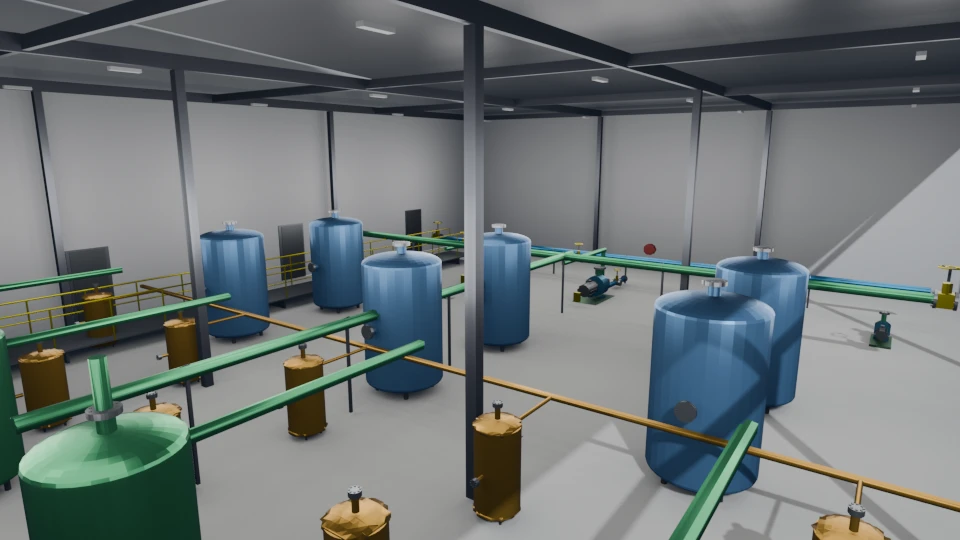
BIM data overlaid in AR at exact GPS coordinates. Walk up to any component and see flow rates, tank levels, inspection dates, and maintenance history.
Interactive 3D Preview
Drag to rotate • Scroll to zoom • This is a real model from the app's library
Augmented Image Tracking
Print a reference image and attach it to any surface. BIMGeoSpace locks 3D models to the tracked image — then keeps them anchored long after the marker has left the camera view.
Lock On & Anchor
Point the camera at the reference image. The moment it's detected, the 3D model snaps to the marker's position and orientation — world-up correction handles sloped or angled surfaces.
Keeps Its Place
Walk away, look elsewhere, come back — the model stays put. Session anchor conversion means the marker only has to be seen once; after that, the phone's own tracking holds the model in place.
Three Intuitive Modes
Switch instantly. One-handed operation in the field.
ADD Mode
Tap any surface to place a 3D model or BIM anchor at that GPS location
POLL Mode
Tap existing anchors to view details, add notes, or attach photos
DELETE Mode
Tap anchors to remove them from the scene and cloud storage
// FIELD DOCUMENTATION
Field Documentation in Action
Place a BIM note at a GPS coordinate, attach a geotagged photo — all in under a minute. Every record is immutable and audit-logged.
Place a BIM Note
Tap any surface in ADD mode to drop a BIM note at that exact GPS coordinate. Come back days later and it's still right where you left it.
Every note is auto-stamped with coordinates, altitude, timestamp, and author. Accuracy halo shows signal quality in real-time.
▲ Link any BIM note to a photogrammetry splat or point cloud — every anchor can reference a reality capture from the same site.
Field to Web in Seconds
Field to Web in Seconds
The moment you drop a note or attach a photo in AR, it's visible on the web dashboard. Your PM sees the issue before you've walked back to the trailer. Offline? The app queues every action and syncs the instant you reconnect — nothing lost.
Attach a Photo
Switch to POLL mode and tap any existing note. Snap a photo and it's automatically geotagged with coordinates, timestamp, and your name — compliance-ready.
Photos and notes sync to the cloud in real-time. Queue offline, sync when connected.
// ANCHOR TYPES
Six Anchor Types
Every anchor you place is one of four types — pick the right one for what you're documenting.

BIM Anchor
CONSTRUCTION DOCUMENTATIONNotes, photos, defects, RFIs — timestamped and immutable. Each anchor can reference a photogrammetry splat or point cloud from the same GPS location.

Hazard Marker
SAFETY & HAZARD TRACKINGHigh-visibility orange billboard in AR. GPS-locked, team-wide, linked to the full Safety Issues workflow with state machine and audit trail.

Photogrammetry Anchor
REALITY CAPTURE · SPLATS & MESHESMarks a location for photogrammetry captures. Multiple captures can stack at the same anchor over time — building a history of how that space looked at different points during construction.

Point Cloud Anchor
DEPTH SCANNING · GEO-REFERENCEDMarks a location for depth-camera point cloud scans. Like the photogrammetry anchor, it supports multiple scans over time at the same GPS point — letting you track how a space changes.

Punch List Anchor
MANAGEMENT · CREW HANDOFFManagers drop punch list items at exact GPS locations for the crew to resolve. Track status, attach photo evidence, log completion notes — closed out only when verified on-site.

Inspection Anchor
INSPECTIONS · HISTORICAL RECORDAssign inspection tasks to the crew or log past inspections at the exact spot they happened. Keeps a GPS-anchored history of what was checked, when, and by whom — one tap away in the field.
Hazard markers are a special case. Placing one kicks off a full safety workflow — state transitions, severity tiers, assignees, audit trail. Here's how that works.
SAFETY ISSUES WORKFLOW ↓// SAFETY WORKFLOW
Safety Issues
Track hazards from spotted to closed. OSHA-aligned categories, severity levels, and a real state machine — not just a note.
// TEAM & ROLES
Team Collaboration
Built for crews, not solo users.
Work flows down from management and status flows back up, all anchored to real places on the site. A superintendent assigns a punch list item, inspection, or safety issue. A field engineer arrives, opens the app, and the AR view guides them directly to the GPS-anchored location. They resolve it, attach photo evidence, and the status syncs back. No phone tag, no email threads, no ambiguity about where the issue is.
- ▸ Superintendents and PMs assign punch lists, inspections, and safety issues from the web dashboard
- ▸ Field engineers walk to GPS-anchored locations in AR — no searching
- ▸ Resolution syncs status back to management automatically
// WEB DASHBOARD
The Web Dashboard
Manage your entire site from a browser. Five tabs: Site Map, 3D Assets, Point Clouds, Projects, and Construction.
Site Map & Anchor Management
Every anchor placed in the field appears on a Leaflet-powered site map in real-time. Browse anchors, view attached photos, and read timestamped notes — all from your desktop browser.
Model & Image Management
Upload 3D models and augmented images from the web dashboard. Assign to anchors and they hot-reload on every connected device — no app restart needed.
// ROADMAP
The Road Ahead
Android-first today. Here's where it's going.
iPhone & iPad
ARKit deployment bringing the same GPS-accurate AR, reality capture, and cloud sync to iOS. Field teams pick whatever device they carry — Android or Apple — and the data meets in the same cloud.
Expanded Anchor Classes
Electrical panels, HVAC zones, structural members, MEP systems, fire suppression — each with specialized data schemas, inspection checklists, and compliance workflows built in.
Interested in BIMGeoSpace?
The closed beta is live — Android first, with iOS on the way. Have an invite code? Create your account on the web dashboard and you're in. Need one? Get in touch.